
Background:
Typing emoji (e.g. 😀😑😬😭😱) on a desktop computer’s physical keyboard is a surprisingly involved process.
The Issue:
On a phone, a user can invoke a special emoji keyboard. But on desktop computers, there are only two solutions: 1) selecting the emoji from a giant on-screen list or 2) hoping that the application you want to type emoji in has specifically implemented its own emoji auto-complete suggestions.
The auto-complete method works OK, but it isn’t general: while you might be able to type :snake: to get a 🐍 in one application, that text probably won’t work in your email client / calendar / Photoshop / etc.
Proposal:
The solution is simple: just modify our keyboard layout so that, say, “shift + control + H” would type a heart emoji, instead of doing whatever it currently does (apparently nothing).
After all, rarely-used characters like “§” and “¶” can be typed directly (on the Mac U.S. layout, this option-6 and option-7), so why not bring this same ease-of-typing functionality to emoji, too!
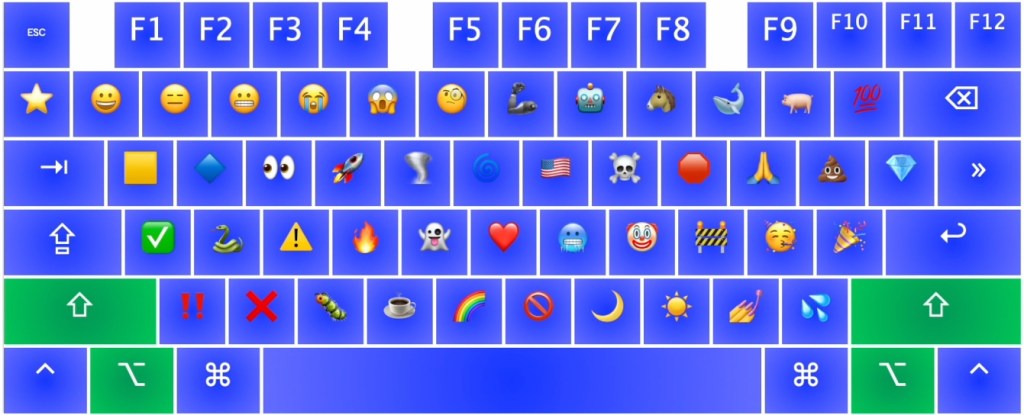
Or, even better, we can replace the useless CAPS LOCK key with a new “emoji” modifier key. Then, a user just types, say, “emoji+S” to type a snake, or “emoji+R” to type a rocket.
Conclusion: Download It Today (for Mac):
Since there’s no “emoji” modifier key yet, we’ll repurpose the “option + shift” modifier keys and make our own emoji-focused keyboard layout.
Here is a Mac-specific keyboard layout that implements the emoji layout shown in Figure 1:
See the installation instructions in that directory. If you download and install that keyboard layout, then you’ll be able to hold option + shift to type emoji directly on your keyboard!
PROS: This is actually a pretty good idea!
CONS: Could cause even more fighting about the exact nature of the emoji library (e.g. “Is the knife emoji too violent?” or “Why does “Antarctica” get a flag despite not being a country?”).


You must be logged in to post a comment.